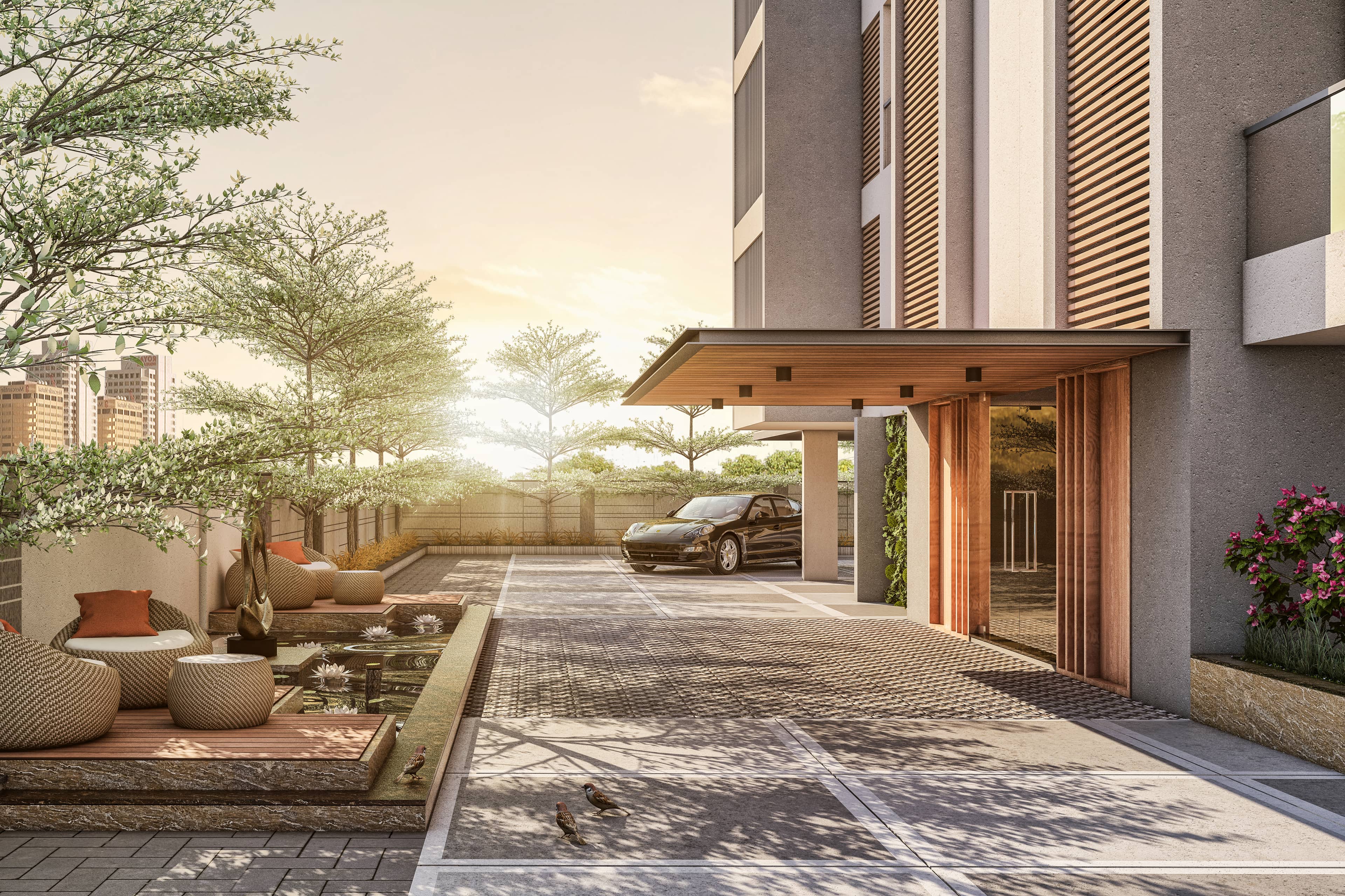
How 3D Renderings Help in Client Approvals and Faster Project Sign-off
Every architect and developer knows the frustration: weeks of design work, detailed drawings delivered, and then... silence. Clients stare at floor plans, squint at elevations, ask dozens of questions, and still can't commit. Approvals drag. Changes pile up mid-construction. Budgets balloon. The root cause? Most clients can't visualize 2D drawings. They're approving what they think they understand, not what you're actually building.
3D renderings solve this visualization gap. They transform abstract plans into tangible experiences — showing clients exactly what they're approving before a single foundation is poured. The result? Faster decisions, fewer revisions, confident sign-offs, and construction that matches expectations. In this comprehensive guide, we explore how professional 3D visualization accelerates approvals, reduces costly changes, and keeps projects on track.
Primary keyword: 3D renderings for client approvals. Related LSI keywords: faster project sign-off, design approval visualization, construction decision-making, client visualization, project approval process, 3D rendering ROI, design communication, stakeholder buy-in.
The approval bottleneck: why traditional methods slow projects
The 2D comprehension gap
Most clients — homeowners, investors, committee members — lack architectural training. Floor plans, elevations, and sections are technical documents. Clients see lines and symbols; architects see finished spaces. This comprehension gap creates:
- Uncertainty: Clients hesitate to approve what they don't fully understand
- Misalignment: Everyone imagines something different from the same drawing
- Late changes: Issues surface during construction when they're exponentially more expensive
- Prolonged reviews: Multiple revision cycles as clients request clarifications
Multiple stakeholders complicate decisions
Commercial and institutional projects involve:
- Developers balancing vision and budget
- Investors evaluating ROI and marketability
- Planning committees assessing community impact
- End users concerned with functionality
Each stakeholder has different priorities and visualization abilities. Aligning them on 2D drawings is slow and error-prone.
Change orders are expensive
Industry data shows that changes made:
- During design: Low cost (time investment)
- During permitting: Moderate cost (resubmission fees, delays)
- During construction: High cost (10–100× the design-stage cost)
Every day of construction delay has real carrying costs, labor impacts, and schedule ripple effects.
How 3D renderings accelerate approvals
1. Immediate spatial understanding
A well-composed 3D rendering answers "what will this look like?" instantly. Clients see:
- Scale and proportion
- Light and shadow
- Material textures and finishes
- Spatial relationships (inside/outside, room flow)
- Context (neighboring buildings, landscaping)
No translation required. No imagination gap. What you see is what you'll build.
2. Alignment across stakeholders
3D visualizations create a shared reference. When everyone — client, architect, contractor, investor — looks at the same photoreal image, they align on:
- Design intent
- Material quality expectations
- Spatial experience
- Aesthetic direction
Fewer misunderstandings mean fewer revisions.
3. Confidence to commit
Clients approve faster when they're confident. 3D renderings remove doubt by:
- Showing realistic environments (not abstract symbols)
- Demonstrating feasibility (materials, light, context)
- Addressing concerns visually before they become verbal objections
Confidence accelerates decision-making.
4. Emotional engagement
Renderings don't just inform — they inspire. A sunrise view through a floor-to-ceiling window, a family gathered in a warm living room, a bustling café terrace — these emotional moments create buy-in that technical drawings can't match.
Emotion shortens approval cycles because stakeholders want the vision, not just accept it.
The psychology of visual decision-making
Cognitive load and decision fatigue
Interpreting 2D drawings requires cognitive effort. The brain must:
- Decode symbols and conventions
- Imagine 3D space from flat projections
- Extrapolate materials and lighting
- Synthesize multiple drawings into a coherent whole
This cognitive load causes decision fatigue. Clients defer decisions when they're mentally exhausted.
3D renderings reduce cognitive load. The brain processes realistic images effortlessly — it's how we navigate the real world. Less effort = faster decisions.
Anchoring and certainty
Psychological research shows people seek certainty before committing to expensive decisions. 3D renderings provide visual anchors:
- "This is what the kitchen will look like."
- "This is the exact stone we'll use."
- "This is how afternoon light will enter the bedroom."
Anchors reduce perceived risk and enable sign-off.
Social proof and consensus
In group decision-making (boards, committees, families), visual consensus is powerful. When everyone nods at a rendering, momentum builds. Social proof accelerates individual buy-in.
Approval workflows: where 3D renderings fit
Residential projects
Concept approval (early stage)
- Use: Stylized or clay renders to explore massing and layout
- Stakeholders: Homeowner, family members
- Goal: Align on design direction before detail work
- Deliverables: 2–3 exterior views, key interior spaces
Design development approval (mid-stage)
- Use: Photorealistic renders showing materials, finishes, lighting
- Stakeholders: Homeowner, interior designer, contractor
- Goal: Lock in material selections and spatial design
- Deliverables: Hero exterior, 4–6 interior views, material close-ups
Final sign-off (pre-construction)
- Use: Polished renders matching final specifications
- Stakeholders: All parties
- Goal: Confirm "this is what we're building"
- Deliverables: Complete set matching floor plans and specs
Commercial and institutional projects
Pre-design approvals
- Use: Conceptual renders for feasibility and vision
- Stakeholders: Investors, planning departments, community groups
- Goal: Secure support and funding before detailed design
- Deliverables: Context views, aerial masterplan, key public spaces
Schematic design approvals
- Use: Photoreal or hybrid renders showing design intent
- Stakeholders: Client, design team, consultants
- Goal: Align on massing, materials, program organization
- Deliverables: Exterior views, interior public spaces, section perspectives
Design development and construction document approvals
- Use: Final-quality renders matching specs
- Stakeholders: Client, contractor, permitting authorities
- Goal: Lock design and begin construction with confidence
- Deliverables: Comprehensive views covering all major spaces and façades
Municipal and planning approvals
Community presentations
- Use: Accessible, context-rich visualizations
- Stakeholders: Public, planning boards, elected officials
- Goal: Communicate impact and gather feedback
- Deliverables: Eye-level views, aerial context, before/after comparisons
Permit submissions
- Use: Accurate, context-integrated renders
- Stakeholders: Planning staff, review boards
- Goal: Demonstrate compliance with codes and design guidelines
- Deliverables: Views from public streets, shadow studies, material accuracy
Cost savings: the ROI of early visualization
Preventing late-stage changes
Scenario: A developer approves interior finishes based on samples and 2D drawings. During framing, they visit the site and realize the ceiling feels lower than expected. They request a change from 8' to 9' ceilings.
Cost impact:
- Structural modifications: $50,000
- Electrical and HVAC adjustments: $25,000
- Schedule delay: 3 weeks (carrying costs ~$15,000)
- Total: $90,000+
With 3D rendering:
- Pre-construction interior rendering shows ceiling height in context
- Client requests 9' ceilings during design
- Design adjustment cost: $2,000 (architectural fees)
- Savings: $88,000
Reducing revision cycles
Each design revision cycle costs:
- Architect time: $5,000–$15,000 (depending on scope)
- Consultant re-coordination: $2,000–$10,000
- Schedule impact: 1–3 weeks
Projects with 3D visualization typically complete with 30–50% fewer revision cycles because:
- Clients understand and approve designs faster
- Misunderstandings are caught visually before documentation
- Material and finish selections are locked earlier
Accelerating sales and funding
Pre-sales and reservations:
Developers using 3D renderings report:
- 20–40% faster reservation rates
- Higher deposit confidence (fewer cancellations)
- Ability to launch sales 6–12 months before completion
Faster sales = earlier cash flow = lower financing costs.
Investor presentations:
3D visualizations improve funding success by:
- Demonstrating project feasibility and market appeal
- Creating emotional connection to the vision
- Differentiating proposals from competitors
Stakeholder-specific benefits

For homeowners
- Confidence: See your dream home before construction starts
- Control: Make informed material and layout decisions
- Peace of mind: Avoid costly surprises during construction
- Family alignment: Get spouse and kids excited and aligned
For developers
- Speed: Faster internal and external approvals
- Sales: Pre-sell units with compelling visuals
- Risk reduction: Lock design before construction begins
- Stakeholder management: Keep investors and partners confident
For architects
- Client satisfaction: Happy clients who understand and love the design
- Efficiency: Fewer revision cycles and change requests
- Reputation: Deliver projects that match client expectations
- Competitive edge: Win more projects with compelling presentations
For contractors
- Clarity: Build what's been approved; fewer field changes
- Schedule certainty: Reduced delays from client indecision
- Budget predictability: Fewer change orders and unknowns
Best practices for approval-focused renderings
Show realistic, achievable quality
Avoid over-idealizing. Renderings should match what's actually buildable within budget. Over-promising in visuals leads to disappointment.
Include context and scale
Show neighboring buildings, streets, landscaping, and people. Context helps clients evaluate the design holistically.
Provide multiple viewpoints
- Eye-level (human experience)
- Elevated (spatial relationships)
- Aerial (site integration)
- Interior key spaces (functionality and atmosphere)
Different stakeholders need different perspectives.
Match design stage
- Early stage: Conceptual/stylized to encourage feedback
- Mid stage: Photoreal with flexibility for adjustments
- Final stage: Spec-accurate for construction confidence
Enable comparison
Provide before/after views, day/night options, or material alternatives to facilitate decision-making.
Iterate quickly
Early-stage client feedback is valuable. Use fast, lower-fidelity renders to test ideas before investing in final-quality images.
Real-world approval scenarios
Scenario 1: Residential addition
Client: Homeowners planning a second-story addition
Challenge: Worried about how it will look from the street and impact neighbors
Solution: 3D rendering showing addition in context with existing home and neighboring properties
Outcome: Approved first review; construction proceeded without changes; neighbors supportive
Scenario 2: Retail tenant improvement
Client: National retailer customizing leased space
Challenge: Corporate HQ needs to approve local design; 2D plans not sufficient
Solution: Photoreal interior renderings matching brand standards
Outcome: Corporate approval in 2 weeks (typical: 6–8 weeks); construction started on schedule
Scenario 3: Civic building expansion
Client: Library board planning expansion
Challenge: Public concerns about scale and aesthetics; contentious planning approval
Solution: High-quality renderings from multiple public viewpoints; before/after comparisons
Outcome: Planning approval after one public hearing (typical: 3–4); construction approved unanimously
Overcoming common objections
"3D renderings are too expensive"
Response: Compare the cost of renderings ($2,000–$10,000) to a single construction change order ($20,000–$100,000+). Renderings are insurance against expensive mistakes.
"We don't have time"
Response: Renderings take 2–4 weeks. Construction delays from client confusion take months and cost far more. Invest time upfront to save time (and money) later.
"Our clients are professionals; they can read drawings"
Response: Even architects and engineers appreciate 3D confirmation. Visualization isn't about intelligence — it's about certainty and alignment.
"We'll do renderings for marketing, not approvals"
Response: By the time marketing begins, design is locked. Using renderings earlier (during design) prevents the costly changes that erode profit margins.
FAQ
How much do 3D renderings cost for client approvals?
Costs vary by project scope. Residential: $1,500–$5,000 for a set of approval images. Commercial: $5,000–$20,000 depending on complexity and number of views. Compare this to the cost of a single construction change order (often $20,000–$100,000+).
How long does it take to create approval renderings?
Typically 2–4 weeks from design freeze to final images. Rush services (1 week) are available at premium rates. Plan renderings into your project timeline early to avoid delays.
At what project stage should we invest in 3D renderings?
Start with conceptual renders during early design to explore options. Invest in high-quality photoreal renders at design development (before finalizing materials and specs). Use final renders for construction sign-off and marketing.
Can we make changes after seeing the renderings?
Yes — that's the point. Early-stage renderings are meant to catch issues and enable informed changes before construction. Build 1–2 revision rounds into your rendering contract to iterate based on client feedback.
Do 3D renderings replace physical samples and site visits?
No, they complement them. Use renderings for spatial understanding and material visualization, samples for tactile confirmation, and site visits during construction for quality assurance. Combined, they create confidence and alignment.
Conclusion: visualization is project insurance
3D renderings aren't luxury marketing tools — they're project insurance. They protect budgets, timelines, and reputations by ensuring clients understand and approve what they're buying before construction begins. The cost of visualization is a fraction of the cost of one mid-construction change order, and the time investment of 2–4 weeks is insignificant compared to months of approval delays.
Faster approvals mean:
- Earlier construction starts
- Fewer costly changes
- Happier clients
- Predictable budgets and schedules
- Projects that match expectations
The question isn't whether you can afford 3D renderings for client approvals — it's whether you can afford not to.
Space Visual partners with architects, developers, and homeowners to create approval-focused 3D visualizations — accurate, realistic, and delivered on time. We understand the approval process and know how to structure visuals that answer stakeholder questions and accelerate sign-off.
Explore Latest Blogs
3D Product Visualization: Boosting E‑commerce Sales with Interactive Renders
A comprehensive guide to 3D product visualization for e‑commerce — how interactive renders, 360° viewers, and animations increase conversions, reduce photoshoot costs, and speed up launches.


Using 3D Visualization in Architecture Competitions: How to Stand Out
A strategic guide to using 3D visualization in architecture competitions — covering rendering techniques, presentation strategies, and communication tactics to impress juries and win.